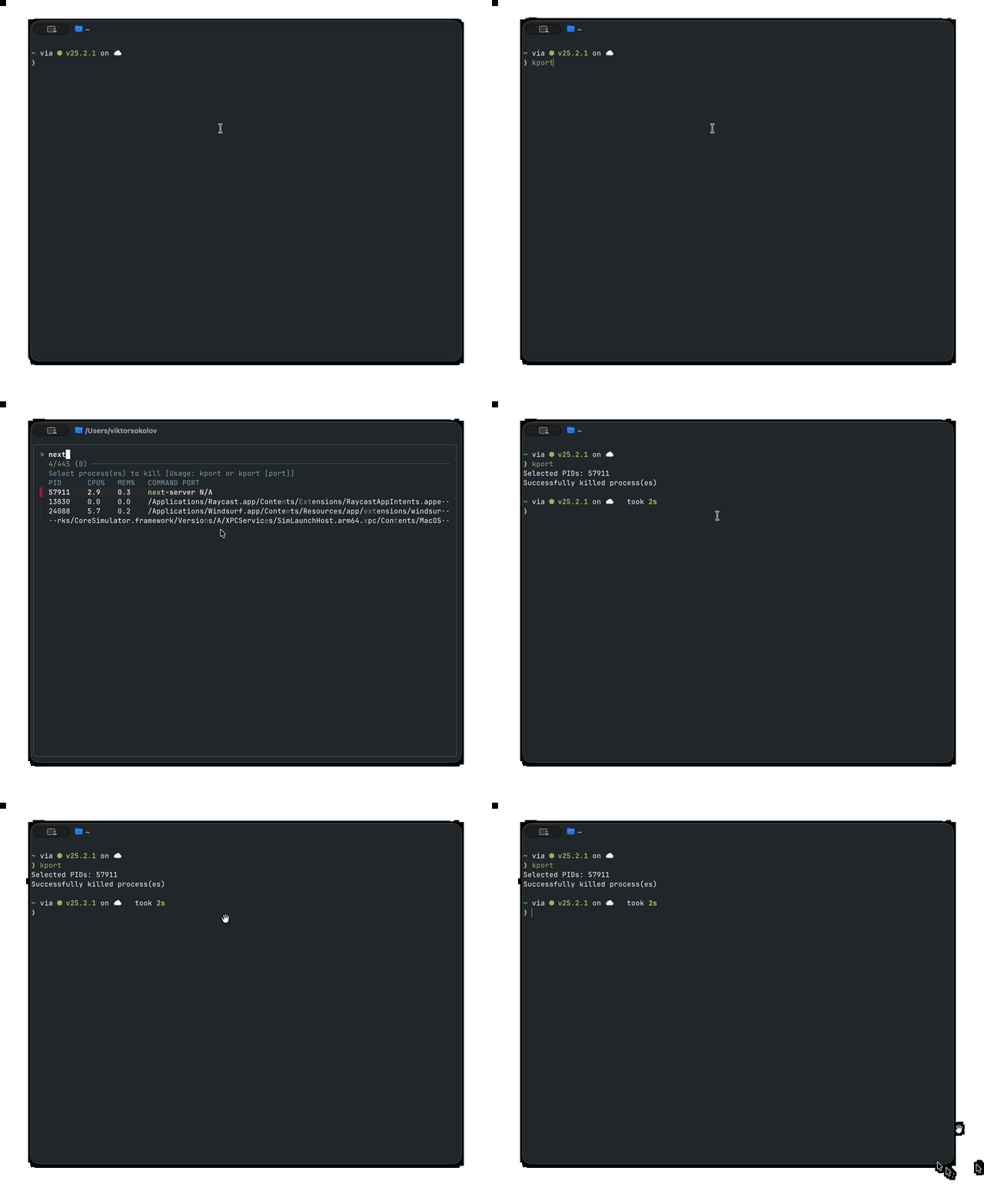
Kill processes interactively with FZF
I was tired of the tedious process of running ps aux | grep <process> and then manually copying PIDs to kill processes.
This bash function lets you interactively search and kill processes using the fuzzy-finding power of FZF, with support for both regular processes and port-specific killing.
Here's the code to add to your shell config (e.g., .bashrc or .zshrc):
1kport()2{3  local pids signal port_info4  signal="15"5
6  # Format strings and commands7  local header_format="%-8s %-6s %-6s %-s %s\n"8
9  local ps_filter='NR>1 && $11 !~ /^(\[|\/System\/|\/usr\/libexec\/)/ && $11 != "ps"'10  # Filter: skip header, exclude system processes and ps command itself11  local ps_printf='{printf "%-8s %-6.1f %-6.1f %-s %s\n", $2, $3, $4, $11, "N/A"}'12  # Format: PID, CPU%, MEM%, COMMAND, PORT (N/A for regular processes)13  local ps_awk_cmd="$ps_filter $ps_printf"14
15  local lsof_awk_cmd='NR>1 {printf "%-8s %-6s %-6s %-s %s\n", $2, "N/A", "N/A", $1, $9}'16  local fzf_header="Select process(es) to kill [Usage: kport or kport [port]]"17
18  # Unified function to get process list19  _get_process_list() {20      {21          printf "$header_format" "PID" "CPU%" "MEM%" "COMMAND" "PORT";22          # Regular processes23          ps aux | awk "$ps_awk_cmd" | sort -k2 -nr;24          # Processes listening on ports25          lsof -iTCP -sTCP:LISTEN -n -P 2>/dev/null | awk "$lsof_awk_cmd" | sort -k5;26      }27  }28
29  # Unified function to kill processes30  _kill_processes() {31      local target_pids="$1"32      local description="$2"33
34      if [[ -n "$target_pids" ]]; then35          echo "$description"36          if echo "$target_pids" | xargs kill -"$signal" 2>/dev/null; then37              echo "Successfully killed process(es)"38          else39              echo "Error: Failed to kill some processes. Try with signal 9." >&240              return 141          fi42      fi43  }44
45  # Parse arguments: if first arg is a port number, kill processes on that port46  if [[ -n "$1" && "$1" =~ ^[0-9]+$ ]]; then47      # Filter process list for specific port48      port_info=$(_get_process_list | grep -i ":$1$")49      if [[ -z "$port_info" ]]; then50          echo "No processes found listening on port $1"51          return 152      fi53
54      # Extract PIDs and kill55      pids=$(echo "$port_info" | awk '{print $1}')56      _kill_processes "$pids" "Processes listening on port $1:"57      return58  fi59
60  # Interactive mode61  pids=$(_get_process_list | fzf -m --header="$fzf_header" --header-lines=1 | awk '{print $1}')62  _kill_processes "$pids" "Selected PIDs: $pids"63}
How it works:
- Modular design: Uses internal helper functions
_get_process_list()and_kill_processes()for cleaner code organization - Port-specific killing: If you provide a port number as an argument, it filters the process list and kills processes listening on that specific port
- Interactive mode: Without arguments, shows a combined list of regular processes and listening ports via FZF
- Process filtering: Uses
ps auxfor regular processes andlsoffor port-based processes, filtering out system processes - Smart display: Shows PID, CPU%, MEM%, COMMAND, and PORT in a clean, columnated format
- CPU sorting: Sorts regular processes by CPU usage (highest first) for quick identification of resource hogs
- FZF Integration: Uses FZF for fuzzy searching with multi-select support (
-mflag) - Unified killing: Centralized process killing logic with consistent error handling and success messages
Usage examples:
1# Interactive mode - shows all processes and listening ports2kport3
4# Kill processes on specific port5kport 3000  # Kill processes listening on port 30006kport 8080  # Kill processes listening on port 8080
Now, just type kport to pop up a searchable list of all your user processes and listening ports, or use kport <port> to quickly kill processes on a specific port. Find what you need to kill instantly and manage your system processes like a pro.